
Simplify Your React Native Development
Introducing the Universal File Structure

Working on existing React Native projects can be challenging when there is no consistent file structure in place. To alleviate this issue and promote better collaboration among developers, I propose the adoption of a universal file structure that offers simplicity and clarity. In this article, we will introduce a recommended file structure that can be easily understood and embraced by React Native developers.
The Universal File Structure
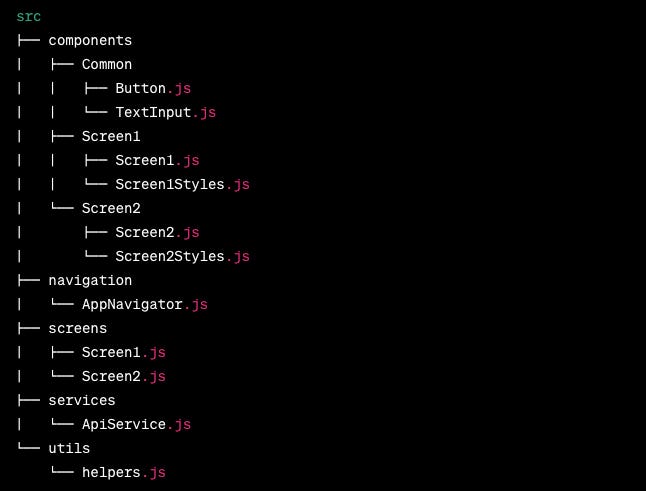
Unpacking the Universal File Structure
src/components
The components folder serves as a home for reusable components that can be shared across multiple screens. This folder promotes organization by grouping components based on their functionality, ensuring easy access and maintenance.
src/screens
The primary screens of your program are housed in the screens folder. Each screen may have its own folder that contains the screen component as well as any coordinating styles and support routines. This structure makes it easier to design and debug programs and helps handle screen-specific logic effectively.
src/navigation
You may discover files pertaining to app navigation under the navigation folder. Think about including a file like AppNavigator.js, which creates the navigation framework for your app using tools like React Navigation. Modifications and enhancements to your app's navigation are made simple by centralizing navigational issues.
src/services
The services folder offers a specific location for managing the services or APIs that your app uses. You encapsulate API requests and other essential services by creating files such as ApiService.js. Maintainability, testability, and debugging simplicity are all facilitated by the separation of service-related functionality.
src/utils
The utils folder provides utility functions or assistance files that may be used throughout your project. It acts as a clearinghouse for frequently used code fragments, including routines for data processing, date formatting, or validation. This centralization promotes code reuse and prevents duplication.
App.js
As the entry point of your app, App.js orchestrates the main components, configures libraries, and handles app-level logic. While a relatively small file, it plays a crucial role in initializing your app's structure and dependencies.
Conclusion
Implementing a standardized and universal file structure is an important step in promoting teamwork and easing the transfer between development teams for React Native projects. The suggested file structure presented in this article seeks to make your projects simple and clear, making it easier for developers to traverse and comprehend codebases.
React Native developers can benefit from enhanced codebase organization, scalability, and reusability by adopting this common file structure and following good programming techniques, such as modularity and separation of concerns.
Let's embrace the common file format and streamline React Native development to make it easier and more fun for all participating devs.
Dear friends, I am thrilled to share some exciting news with you all! Our newsletter family has reached an incredible milestone - we now have over 7,000 subscribers! This achievement is a testament to the remarkable community we have built together, and I want to express my heartfelt gratitude to each and every one of you.
This milestone is a reflection of the trust and support you have placed in us, and it motivates us to continue delivering valuable content, insights, and resources that cater to your interests and needs. We are committed to enhancing our offerings and providing even more value to our growing community.
Thank you for being a part of this journey, and please help us spread the word by inviting your friends and colleagues to join our newsletter. Together, let's celebrate this milestone and look forward to an exciting future of learning, collaboration, and inspiration!
Warmest regards,